


The layout changes sometimes. That’s why people search for a clear guide. This article explains where the feedback option is and how to use it without confusion.
What Does Feedback Mean on ChatGPT?
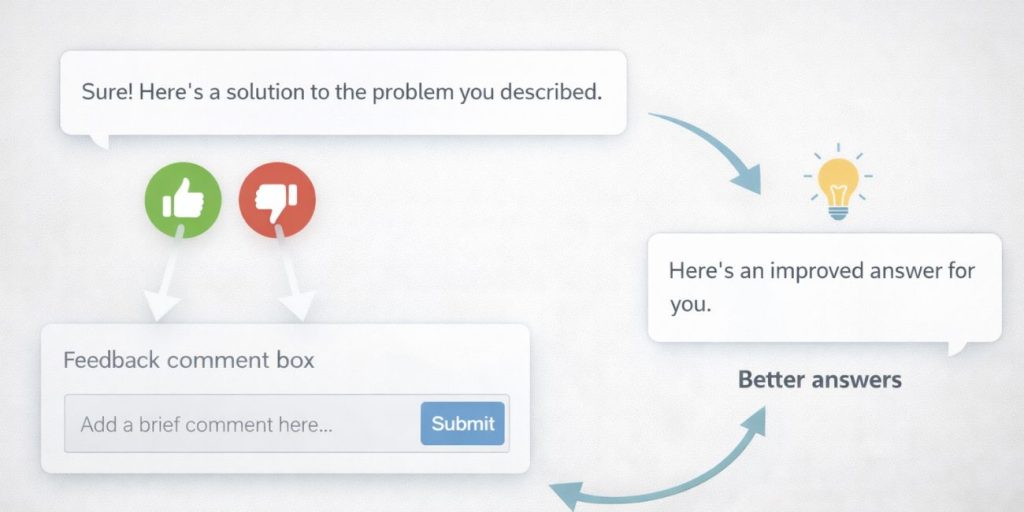

Feedback on ChatGPT means rating a response or sharing a short note about it. You can say if an answer helped you or not. You can also report errors or suggest improvements. OpenAI uses this input to review response quality and user experience.
Where Is the Feedback Option on ChatGPT?
Many users want to give feedback but don’t know where to find the option. ChatGPT shows the feedback tool inside the chat itself. The exact location depends on whether you use the web version or the mobile app.
1. Feedback Option on ChatGPT Web Version
If you use ChatGPT on a desktop browser, the feedback option appears right under each response. You’ll see small icons like a thumbs up and a thumbs down. Click one of them to rate the reply.
After clicking, a small box may appear. It lets you add a short comment. This helps explain what went wrong or what worked well. You don’t need to open settings for this. It’s built into the chat itself.
2. Feedback Option on ChatGPT Mobile App
On the mobile app, the layout looks a bit different, but the idea stays the same.
- Tap the thumbs up or thumbs down under a response
- Some versions show feedback inside a three-dot menu
- You may see a short form after rating
- Updates can slightly change where the option appears
If you don’t see it, update the app and try again.
Why Giving Feedback on ChatGPT Matters?
Feedback helps OpenAI understand how people use ChatGPT. It shows which answers confuse users and which ones help. Over time, this leads to better responses and fewer mistakes.
It also gives users a voice. Instead of just closing the chat, feedback lets you take part in improving the tool you use.
Troubleshooting Common Errors While Giving Feedback on ChatGPT
Sometimes the feedback option doesn’t show or doesn’t work. That can feel annoying, but most issues are simple.
- You are not logged into your account
- The app version is outdated
- The page did not fully load
- Internet connection is unstable
- The response type does not support feedback yet
- Temporary interface changes by OpenAI
Refreshing the page or updating the app fixes most of these.
Conclusion
The feedback option on ChatGPT is easy to find once you know where to look. On web and mobile, it usually appears right below each response. You don’t need special settings or tools.
If you use ChatGPT often, try giving feedback when something feels off. Share this guide with others, and feel free to leave a comment with your experience.