


If the Escort quest in Escape from Tarkov keeps failing, even when you did not die the normal way, you are not alone. Many players run into a problem where the quest resets, auto-fails on load, or loses progress after moving through menus or entering the hideout.
This issue can feel confusing because Escort already has strict quest rules. That makes it hard to tell whether you failed the task normally or got hit by a bug. This guide explains why Escort keeps failing and shows the safest way to stop the resets.
Quick Answer
If Tarkov Escort keeps failing, do not enter the hideout before matching. Queue straight into raid from the menu. If you get an auto-fail message when loading in, restart the game at once, check your quest progress, and keep menu changes to a minimum between raids.
Why Does Tarkov Escort Keep Failing?

Escort can fail for two different reasons. The first is a real quest failure, such as dying, disconnecting, or losing the required raid streak. The second is a bug where the task resets or auto-fails even though you did not break the quest the normal way.
Main causes include:
- Normal Quest Failure Conditions
- Dying During the Required Raid Chain
- Disconnecting or Losing Raid Progress
- Progress Reset After Entering the Hideout
- Auto-Fail Notification When Loading Into Raid
- Bugged Progress Loss After Menu Changes
- Session-Based Quest Tracking Issue
How to Fix Tarkov Escort Keeps Failing
Go through the fixes below in order. Start with the safest workaround first, then use the extra checks if the quest still resets.
1. Do Not Enter the Hideout Before Matching
This is the most important workaround. A known pattern with Escort is that progress may reset after entering the hideout before starting the next raid.
If you are working through Escort, avoid going into the hideout between runs. Stay in the main menu and queue directly for the next map.
2. Queue Directly Into the Next Raid
Extra menu movement may increase the chance of a false fail. Some players notice better results when they go from the main menu straight into the next raid without stopping in other areas first.
Try this flow:
- Finish the Raid
- Return to the Main Menu
- Check the Task Progress
- Queue the Next Raid Directly
- Avoid Unneeded Menu Changes
3. Restart the Game If You Get an Auto-Fail Message on Load
A common Escort bug happens when the game loads into a raid and suddenly shows a fail message even though you did not die. If that happens, restarting Tarkov right away may help stop the broken session from continuing.
Do this as soon as you notice the problem:
- Back Out if Possible
- Close Tarkov Fully
- Launch the Game Again
- Check the Escort Progress
- Only Continue if the Progress Still Looks Correct
4. Check Whether the quest really resets
Sometimes the game shows a fail notice, but the quest progress does not fully disappear right away. Before you assume the run is lost, open the task screen and confirm what changed.
Look for these signs:
- One Completed Map Still Shows Correctly
- All Progress Is Gone
- The Task Looks Failed Instead of Partially Done
- A New Raid Added No Progress at All
That quick check can save time and stop you from making the situation worse.
5. Avoid Extra Time in Stash and Trader Menus
The Escort bug does not always seem tied to raid gameplay alone. Some players report problems after moving around stash screens, trader menus, or other parts of the menu flow.
You do not need to panic over every click, but it is smarter to keep things simple while doing Escort. Finish the raid, check the task, and queue again.
6. Try to Complete the Remaining Maps in One Session
Escort is already a long quest, and broken tracking makes it even worse. If possible, try to complete your remaining maps in one clean session without long breaks, hideout visits, or unnecessary restarts between successful raids.
This does not guarantee success, but it lowers the number of chances for the bug to show up.
7. Make Sure You Are Not Hitting a Real Fail Condition
Not every Escort failure is a bug. The quest still has normal rules, and those rules matter.
Watch out for these real fail triggers:
- Dying in Raid
- Disconnecting Before a Proper Finish
- Going Missing in Action
- Letting the Raid Timer Run Out
- Losing the required clean progress chain
If one of those happened, the reset may be real and not caused by the bug.
8. Avoid Risky Raids That Can End in Run-Through or Bad Extractions
Escort is the kind of task where sloppy raids can ruin good progress. Even if the bug is the main problem, you still want clean extractions and stable runs.
That means you should:
- Play Safe Instead of Chasing Extra Fights
- Avoid Late Panic Extractions
- Keep a Stable Route in Mind
- Stay Focused on the Quest Goal
9. Watch for the Session Pattern
Some players notice Escort behaves badly only during a certain session. The quest may work fine at first, then start auto-failing after one bad load or one strange menu transition.
If that starts happening, do not keep forcing raids back to back in the same broken state. A full restart is often the smarter move.
10. Keep a Record of Which Maps Already Counted
Escort covers several maps, and losing track makes the bug more frustrating. Write down which locations already counted so you can compare that list with the task screen if progress changes.
This helps in two ways. First, it lets you catch a false reset faster. Second, it makes it easier to explain the issue if you decide to report it.
11. Report the Bug If the Problem Keeps Repeating
If Escort keeps auto-failing even after you avoid the hideout and restart the game, send a bug report. Include clear details so the issue is easier to track.
Useful details include:
- The Map You Were Loading Into
- Whether You Entered the Hideout Before Queueing
- Whether the Fail Message Appeared on Load
- Whether the Progress Reset Fully or Partly
- A Screenshot of the Task Screen
Maps and Rules That Still Matter for Escort
Escort is not a normal easy task. You still need to respect the quest rules while working around the bug.
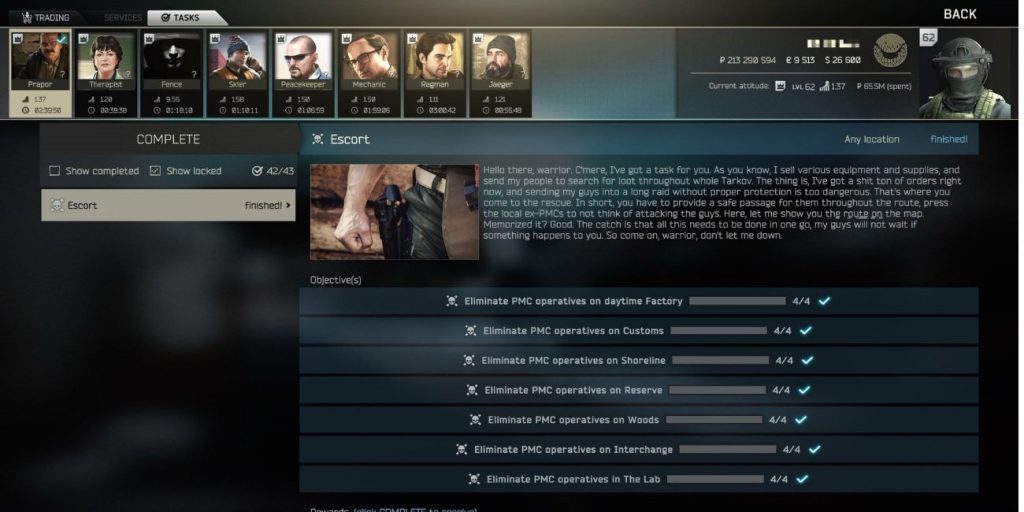
The task includes required kills or progress across these locations:
- Factory
- Customs
- Shoreline
- Reserve
- Woods
- Interchange
- The Lab
- Ground Zero
If one map is still unfinished, the whole run remains at risk until the full requirement is done.
How to Prevent Escort From Resetting Again
These habits can lower the chance of seeing the same problem again.
- Avoid the Hideout Before Matching
- Queue Straight From the Main Menu
- Restart Tarkov After Any Strange Fail Popup
- Keep Menu Movement Simple
- Check Task Progress After Each Raid
- Try to Finish Remaining Maps in One Session
- Avoid Disconnects and Risky Raid Endings
- Save Screenshots if Progress Looks Wrong
Final Thoughts
The Escort quest can fail for real reasons, but it can also fail because of a frustrating bug. That is why this quest feels worse than a normal Tarkov task. The safest path is simple. Stay out of the hideout, queue straight into raid, restart the game if you get an auto-fail on load, and keep checking your progress after each run.
If Escort kept failing for you, leave a comment and share whether the problem happened after hideout use, raid loading, or a normal raid death.