


Seeing the message “We had a server error…” on Reddit can stop you from loading posts, comments, or even your own profile. When this happens, Reddit feels broken. You can’t scroll properly, replies fail to load, and posting may not work at all.
This guide helps you understand why this error occurs, what usually causes it, how to fix it step by step, and how to reduce the chances of encountering it again.
Common Causes of “We Had a Server Error…” on Reddit


This error appears when Reddit cannot finish a request between your device and its servers. The problem is often temporary, but several common issues can trigger it.
- Reddit servers under heavy load or partial outage
- Expired or broken login session tied to your account
- Corrupted app cache or browser cookies
- Outdated Reddit app or unsupported browser version
- Weak or unstable internet connection
- VPN or proxy IP blocked by Reddit
- Browser extensions blocking scripts or requests
Even one of these can be enough to cause the error.
How To Fix “We Had a Server Error…” on Reddit
The right fix depends on whether the problem comes from Reddit itself, your device, your app or browser, or your network. Start with the simplest fixes and move forward only if the error keeps appearing.
Fix #1: Refresh Reddit and Give the Server Time
Not every server error needs action. Reddit handles massive traffic, and short server-side hiccups are common, especially during busy hours or breaking news events. When this happens, Reddit may fail to load content correctly for a short time.
If the error appears suddenly across multiple pages or actions, refresh once and stop. Repeated refreshes can overload the request queue, prolonging the issue. Waiting a few minutes often allows Reddit’s servers to stabilize and resume normal operation.
This fix works best when the error feels widespread rather than tied to one specific action.
Fix #2: Log Out and Log Back In to Reset Your Session
Reddit relies on active login sessions to process votes, comments, and page loads. When a session expires or becomes corrupted, Reddit may still show you as logged in but fail to validate requests properly.
Logging out clears the broken session data stored on your device. When you log back in, Reddit creates a new session and reconnects your account cleanly to its servers. This often restores normal behavior immediately.
If you use Reddit on multiple devices, make sure you log out and back in on the device where the error appears. Sessions are handled per device, not globally.
Fix #3: Fully Restart the Reddit App or Browser
Apps and browsers don’t always release resources correctly. When Reddit stays open for long periods, background requests can freeze or stack up. Over time, this can trigger server errors even when Reddit itself is working.
Close the Reddit app completely so it is not running in the background. On desktop, close all Reddit tabs and shut down the browser fully. Simply minimizing the window is not enough.
After reopening, load Reddit fresh and retry the action that failed. This clears stuck requests and forces a clean connection to Reddit’s servers.
Fix #4: Clear Cache and Cookies Linked to Reddit
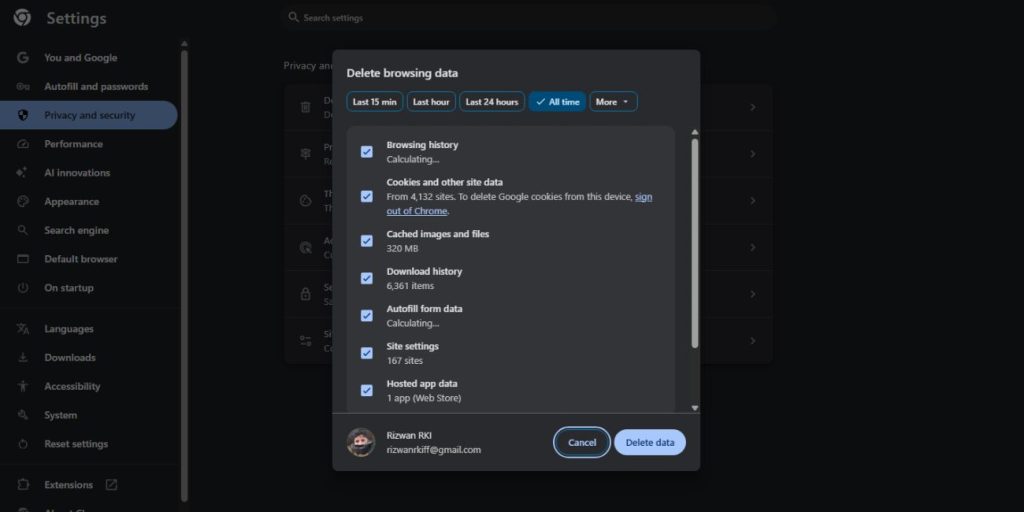
Cached data helps Reddit load faster, but an outdated or corrupted cache can break server communication. This is common after app or browser updates or after long sessions without restarts.
Clearing the cache removes stored files that no longer match Reddit’s current server responses. Clearing cookies resets stored session and login data that may be causing conflicts.
You should try this fix if the error:
- Appears randomly
- Persists after restarts
- Happens only on one browser or app
After clearing cache and cookies, restart the app or browser before testing again. This step often fixes stubborn, repeating errors.
Fix #5: Update the Reddit App or Your Web Browser
Reddit updates its backend systems frequently. Older app versions or browsers may struggle to communicate with newer server endpoints, leading to repeated server errors.
Check your app store for Reddit updates and install them if available. If you use Reddit in a browser, make sure the browser itself is fully up to date.
Updates often fix issues related to loading, authentication, and request handling. Running outdated software increases the chance of compatibility problems.
Fix #6: Disable VPN or Change Your Network
VPNs are a common hidden cause of Reddit server errors. Some VPN IP addresses are rate-limited or temporarily blocked by Reddit, especially shared or low-quality servers.
Turn off your VPN and reload Reddit. If the error disappears, the VPN was the cause. If you are not using a VPN, try switching networks instead.
Moving from Wi-Fi to mobile data or to another stable network can immediately fix the issue, especially if your current connection drops packets or interrupts requests.
Fix #7: Test Reddit on Another Device or Browser
Testing Reddit elsewhere helps you locate the problem quickly. Open Reddit on a different browser, device, or app using the same account.
If Reddit works fine there, your account is not the issue. The problem is local to your original app, browser, or device setup.
This fix doesn’t solve the issue directly, but it tells you where to focus next instead of guessing.
Prevention Tips to Avoid This Error in the Future
You can’t stop Reddit outages, but you can reduce how often you see this error.
- Keep the Reddit app and browser updated
- Restart the app if it feels slow or buggy
- Clear the cache occasionally
- Avoid unstable VPN servers
- Use a reliable internet connection
- Avoid rapid repeated actions
Small habits like these keep sessions clean and reduce server conflicts.
Conclusion
The “We had a server error…” message on Reddit usually points to a temporary server, session, or network issue. It does not mean you are banned or restricted. Most of the time, the problem clears with a refresh, restart, or short wait.
If the error persists even after trying all fixes, the safest option is to wait for Reddit to resolve it on their end. Apply the prevention tips to reduce future interruptions and keep Reddit running smoothly.