



If you’re using ComfyUI and suddenly see “Reconnecting…” at the top, it can break your workflow. Your image or video generation stops, and nothing moves. When this happens, the connection between the interface and the backend gets interrupted.
But don’t worry. In most cases, it’s fixable. In this guide, you’ll learn what this error means, why it happens, how to fix it step by step, and how to prevent it in the future.
What Is ComfyUI Reconnecting Error?
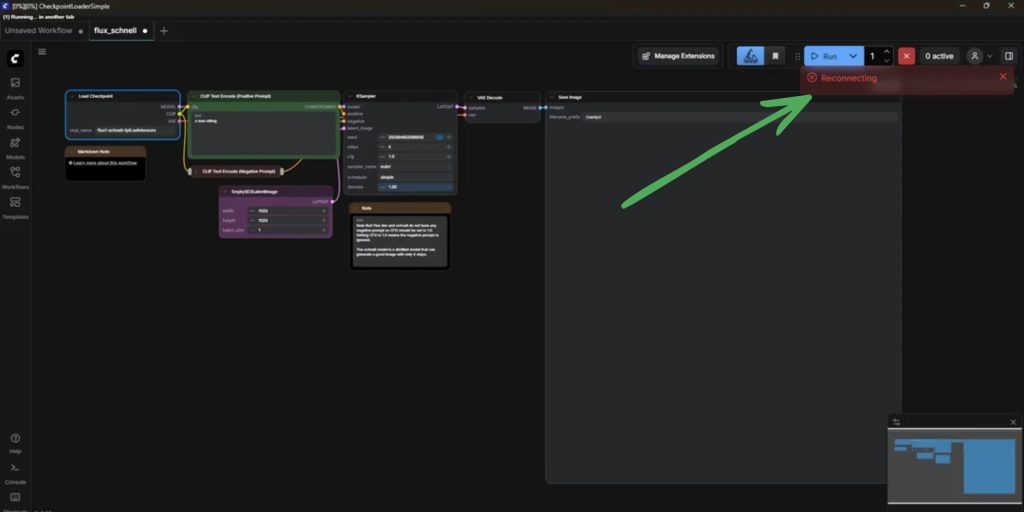

The reconnecting error means your ComfyUI interface lost connection with its backend server. ComfyUI uses WebSocket to send data between the browser UI and the local server. When this connection breaks, the system shows “Reconnecting…” and stops processing tasks.
You usually see this error while running workflows, loading models like Stable Diffusion, or generating images. It appears in your browser while ComfyUI is running on a Localhost setup. The UI may freeze, and your generation task may fail or stop completely.
Common Causes of ComfyUI Reconnecting Error
This error can happen for several reasons, depending on your system, GPU, or setup. Below are the most common causes you should be aware of.
- GPU overload causing VRAM limits to be exceeded
- Backend crash in Python
- Broken WebSocket connection
- Browser tab crash or instability
- Corrupted Cache
- Issues with Localhost connection
- Heavy models in Stable Diffusion causing system stress
How to Fix ComfyUI Reconnecting Error
To resolve this issue efficiently, try the fixes below one by one. Some problems come from your hardware limits, while others are related to the connection or backend.
Fix #1: Restart ComfyUI
Sometimes this error happens due to a temporary crash. The backend server running ComfyUI may stop responding. Close the ComfyUI window or terminal, then start it again. This reloads the system and restores the connection between UI and backend.
Fix #2: Reduce Model Size or Steps
Large models or high steps can overload your GPU. When VRAM runs out, the system may crash and disconnect. Try lowering resolution, steps, or batch size. This reduces load and helps ComfyUI run smoothly.
Fix #3: Check GPU and VRAM Usage
If your GPU memory is full, ComfyUI may fail during generation. Monitoring usage helps you understand the limit.
Follow the steps below to easily check GPU usage:
- Open Task Manager (Windows)
- Go to the Performance tab
- Click on GPU section
- Check VRAM usage while running ComfyUI
- Stop tasks if usage is too high
- Restart generation with lower settings
This helps avoid overload issues.
Fix #4: Restart Backend (Python Server)
The backend running in Python may crash during execution. Restarting it can fix the issue.
Here are the following steps which help you to restart backend:
- Close the ComfyUI terminal or command window
- Stop all running processes
- Reopen the terminal
- Run the ComfyUI start command again
- Wait until it fully loads
- Refresh the browser
This reconnects the UI with the backend.
Fix #5: Refresh Browser
Sometimes the issue is just the browser losing connection. Since ComfyUI runs in a browser, refreshing the page can reconnect it to the server. Press refresh or reopen the tab and try again.
Fix #6: Clear Browser Cache
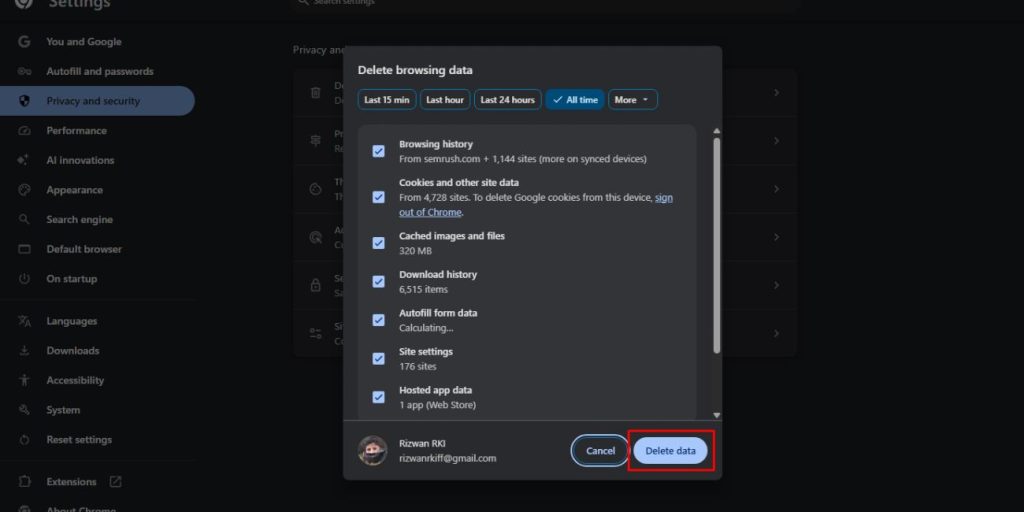
Corrupted cache can disrupt the connection between the UI and backend. Follow these simple steps to clear the cache easily and avoid any confusion:
- Open browser settings
- Go to Privacy or History
- Click Clear browsing data
- Select cache and cookies
- Confirm the action
- Restart browser
After that, open ComfyUI again.
Fix #7: Check Localhost Connection
ComfyUI runs on a Localhost, so if the connection breaks, the UI cannot communicate with the backend. Make sure your server is still running, and no firewall or system setting is blocking it.
Prevention Tips to Avoid ComfyUI Reconnecting Error
Preventing this error helps keep your workflow smooth. Here are some simple tips:
- Use smaller models and optimized settings
- Monitor GPU and VRAM usage regularly
- Keep your Python environment updated
- Clear browser cache from time to time
- Avoid running too many tasks at once
- Use stable system resources
- Restart ComfyUI after long sessions
Conclusion
In short, the ComfyUI reconnecting error happens when the connection between the UI and backend breaks. This is often caused by GPU overload, backend crashes, or browser issues.
Try the fixes step by step, and most of the time, the issue will be resolved quickly. If it still happens, you may need to check your system setup or environment. If this guide helped you, share it or leave a comment so others can solve the same problem faster.